


Podofo Android 12 Car Radio Androidauto Carplay 2 Din GPS Car Audio 7"/9"/10" WIFI BT Automotive Multimedia Player For VW Ford
Couldn't load pickup availability
- 🔒 Secure Checkout
- 🚚 Fast Shipping
- 🔄 30-Day Returns
Brand Name: podofo
Display Size: 7"
Display Size: 9"
Display Size: 10"
High-concerned chemical: None
Origin: Mainland China
Din: Double Din
RAM: 6G
Resolution: 1280*720/1024*600
For Vehicle Brands/Model: Universal
Interface: 2 USB port
OSD Language: Chinese (Simplified)
OSD Language: Chinese (Traditional)
OSD Language: albanian
OSD Language: Arabic
OSD Language: Azeri
OSD Language: Irish
OSD Language: ESTONIAN
OSD Language: Belarusian
OSD Language: Bulgarian
OSD Language: Icelandic
OSD Language: Polish
OSD Language: PERSIAN
OSD Language: Boolean text (Dutch South Africa)
OSD Language: Danish
OSD Language: German
OSD Language: Russian
OSD Language: French
OSD Language: Filipino
OSD Language: Finnish
OSD Language: Georgian
OSD Language: Haitian Creole
OSD Language: Korean
OSD Language: Dutch
OSD Language: Galicia
OSD Language: Catalan
OSD Language: czech
OSD Language: Croatian
OSD Language: Latin
OSD Language: Latvian
OSD Language: Lithuanian
OSD Language: Romanian
OSD Language: Maltese
OSD Language: Malay
OSD Language: Macedonian
OSD Language: Norwegian
OSD Language: Portuguese
OSD Language: Japanese
OSD Language: Swedish
OSD Language: Serbian
OSD Language: Slovak
OSD Language: Slovenian
OSD Language: Swahili
OSD Language: THAI
OSD Language: Turkish
OSD Language: Welsh
OSD Language: Ukrainian
OSD Language: Hebrew
OSD Language: Greek
OSD Language: Spain's Basque
OSD Language: Spanish
OSD Language: hungarian
OSD Language: Armenian
OSD Language: Italian
OSD Language: Yiddish
OSD Language: hindi
OSD Language: Urdu India
OSD Language: indonesia
OSD Language: English
OSD Language: Vietnamese
Out Power: 4*45w
Processor Type: mtk
Max External Memory: 64G
Digital Media Format: Mp3
Digital Media Format: MP4
Digital Media Format: WMA
Digital Media Format: JPEG
Is touch screen: Yes
TF/Micro SD Slot: 0
Built-in CD player: No
ROM: 128G
Certification: CE
Processor Speed: 1.5ghz/1.8ghz/2.0ghz
Tuner Type: rds
Special Features: Built-In Speaker/Microphone
Special Features: wifi function
Special Features: Support Can-Bus
Special Features: Built-in GPS
Special Features: Charger
Special Features: Mobile Phone
Special Features: MP3 players
Special Features: Voice Control
Special Features: dsp
Special Features: CarPlay
Special Features: android auto
Special Features: Reversing Input
Special Features: Split Screen
Special Features: Support steering wheel control
Warranty: 1 year
Built-in Screen: Yes
Output Type: Colored
Operating System: Android 11
Built-in DVD Player: No
Item Weight: 1
Voltage: 12 V
Podofo Android 12 Car Radio Autoradio 128G 2 Din 7"/9"/10" Universal WIFI GPS Car Audio Multimedia Player For Nissan Toyota Kia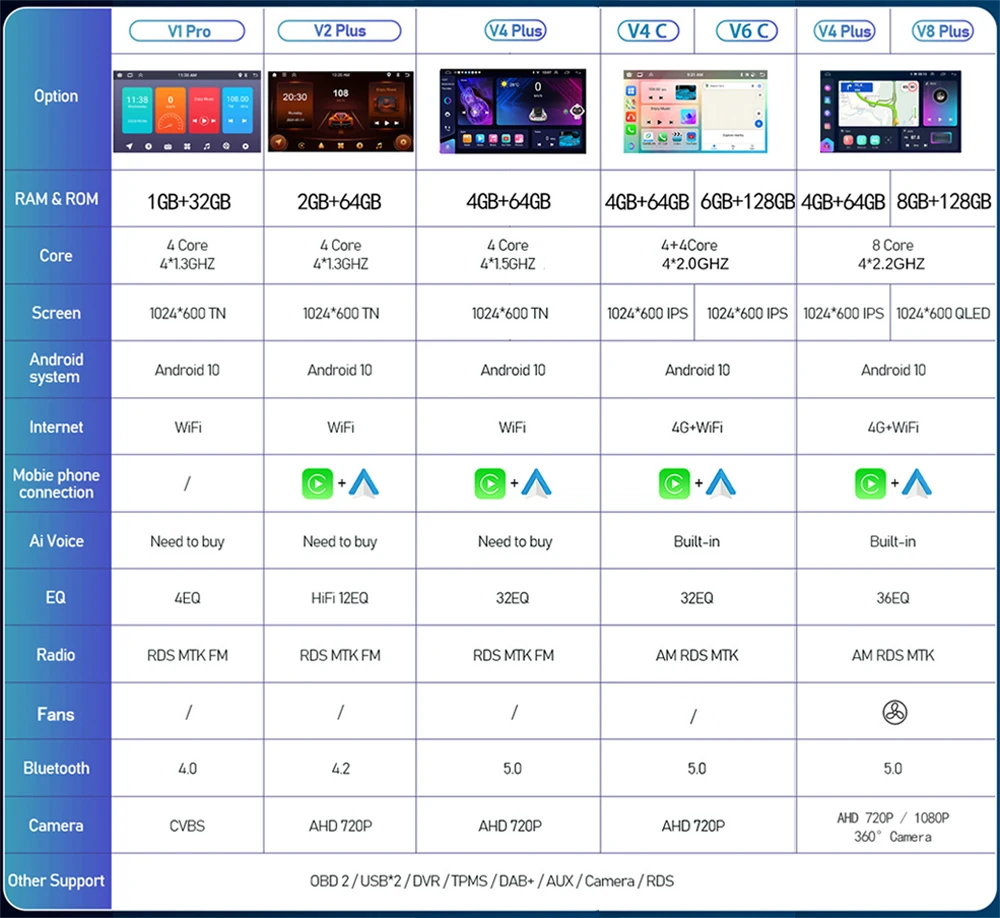
Carplay and Auto: Use your iPhone or Android phone wirelessly/wired through your device and control phone apps. You can make calls, send messages, play music, navigate and more by voice or touch.
Built-in DSP:
Enhance your sound quality with digital signal processing, which reduces noise, distortion, and interference.
Upgrade dual system Mirror link: IOS/Android Mirror link
IOS one-way: IOS supports one-way projection of mobile phones to the machine
Android two-way: Android supports two-way connection of mobile phones
Built-in GPS reception
Users can purchase offline navigation directly from the Play Store. Connect to wifi, Google Maps can be used perfectly, you can go wherever you want, and never get lost again!
Built-in WIFI
connect to WIFI, you will find a new world, the most convenient is the online map.
Reversing camera
You need to select a camera, and the car will automatically switch when it is in reverse gear (optional) Multiple UI chose:


7/9/10.1'' 1024*600 Ultra HD digital screen
HD 1080P: Full capacitive touch screen, simple operation, well-designed in-vehicle user interface
Built-in Bluetooth 4.0, with A2DP/hands-free/phone book
Support Bluetooth hands-free calling
Bluetooth music player
Auto load phone book

Split screen:
Use two apps at the same time on the device's screen, and customize the size and position of each app. You can also switch between apps easily with a swipe gesture.(8Core 64G/128G:support three split screen)
 Intelligent voice assistant(Optional function):
Use the built-in voice assistant to control the device and access various functions. You can ask questions, get directions, check weather, play music, and more with natural language.

Network radio(Optional function):
With mainstream radio stations covering more than 20 countries and regions, you can listen freely to any realtime and popular content in global from your car radio. Global Weather display(Optional function):
Realtime weather infromation in global citys can be showed with network to check temperature(both support degrees centigrade and Fahrenheit)humidity, or Wind conditions, escort for your travel.


Included products
1 x car MP5 player
1 x GPS antenna
1 x power harness
2 USB adapters
1 x RCA input and output cable
1 x cam wire
2 x mounting bracket


Touch screen does not work, troubleshooting steps:
1. please try reset the radio
2. after reset if not working, please Five finger correction. (Use the same pressure with five fingers while holding down the screen)try this more times. then the system will distinguish.(If you do not know how to operate, please contact customer service to see the operation video.)
3. if 1 and 2 not working, please try open the radio, and check the cable between the screen and main board. Unplug and reinsert.
4.If you bought the" 2+32G "carplay option and the radio won't turn on or stays on the "Android" page, please contact customer service to get the software upgrade package and follow the steps below.
1. Unzip the received mandatory upgrade software package on the computer. 2. Copy the entire folder of the extracted software ATCUPG to an empty USB flash drive. 3. Insert the USB stick into the USB interface. 4. Connect the small light cable to 12V, power on, and immediately slide 5 fingers on the screen. When an English character appears, it indicates that the upgrade is in progress. Wait for about 10 minutes for the upgrade to complete. Note: There may be a splash screen during the upgrade process, which is a normal phenomenon and should not be ignored. Just wait for the upgrade to complete.
5.If you try the above methods are not working, please contact customer service! We will solve the problem for you.


